Thank you for installing ReplyHunter! You've just unlocked a smarter way to grow on X (formerly Twitter). Stop shouting into the void or wasting your best insights on low-value posts. ReplyHunter helps you analyze engagement, competition, and timing in real time, so every single reply you write counts.
Here is a quick 2-minute guide to help you land high-impression replies starting today.
Step 1: Pin the Extension for Quick Insights
Before anything else, make sure ReplyHunter is easily accessible:
- Click the Puzzle piece icon 🧩 in the top-right corner of your Chrome browser toolbar.

- Find ReplyHunter in the list.
- Click the Pin icon 📌 next to it.
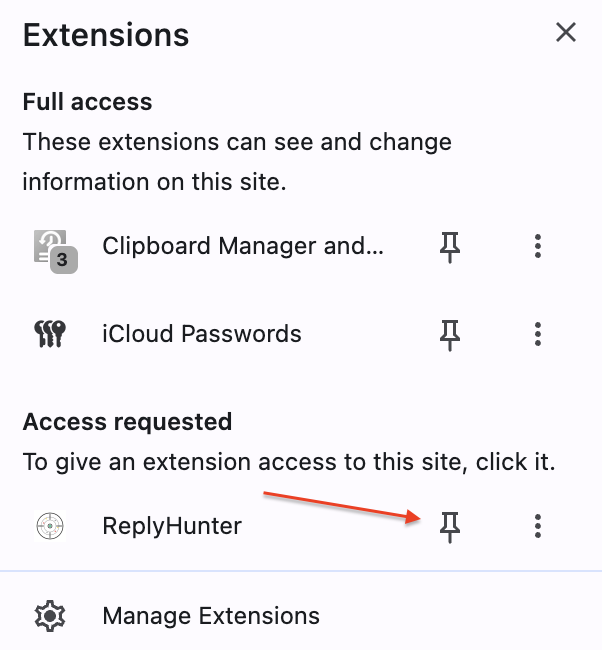
Now you can click our logo anytime to see your personal stats, account configuration, or subscription status!
Step 2: Spot the Overlay on X.com
Head over to X.com, when you browse your timeline or click into a post, you will notice a clean, native metrics panel seamlessly injected below or alongside posts.
This panel evaluates the viability of a post using three core metrics:
- Engagement Velocity: Is this post actively blowing up right now, or has its momentum slowed down?
- Competition Levels: How many replies are already fighting for attention?
- Timing Window: Is it too early (not enough validation), too late (buried in the noise), or just right (The Golden Window)?
Step 3: Hunt for "The Golden Window"
To maximize your impressions, look for posts that fit these criteria before you start typing:
- High Velocity, Low Competition: The post is gaining likes and reposts quickly, but has relatively few replies. Your reply has a massive chance of being pushed to the top!
- Freshness: Catching a high-authority account within the first 5 to 15 minutes of posting usually yields 10x more visibility than replying an hour later.
3 Rules for Writing High-Value Replies
Now that ReplyHunter has found you the perfect target, win the click with your content:
- Don't just agree, add value: Avoid saying "Great point!" Instead, share an actionable takeaway, a counter-perspective, or an illustrative data point.
- Format for readability: Use bullet points, bold text fragments, or line breaks. Make your reply visually stand out in a crowded thread.
- Keep it conversational: Write like a real human looking to build a relationship, not an automated bot trying to drop a link.
Happy hunting! Go ahead and test it out right now on your X timeline.