Introduction
When installing the ReplyHunter Chrome Extension, you might see a prompt stating that the extension can "Read and change your data" on x.com and "Read your browsing history". It is always smart to be cautious about browser permissions, so here is a clear breakdown of exactly why we need these permissions and how we protect your data.
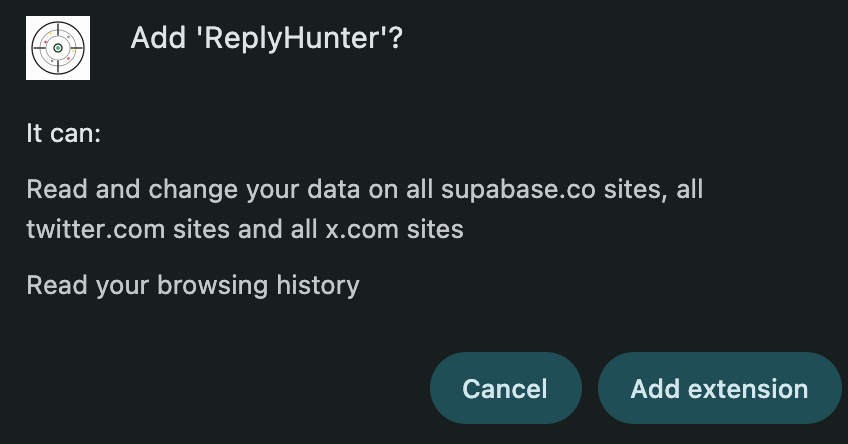
Why do you need to "Read and change my data" on X.com?
This is standard for any extension that interacts with social media. The extension needs to "read" the posts on your screen to analyze them for engagement velocity and competition levels.
It needs to "change" data so it can visually highlight those posts (adding the colored tags) or inject helpful tools right onto your timeline. This does not mean we are messing with your account settings or posting on your behalf. We only modify the interface locally on your screen to provide you with insights.
Why do you need to "Read my browsing history"?
The extension doesn't actually look at your past history or track your browsing across the web. It simply needs to see the URL of the current tab you have open, so it knows when you are actively looking at an X.com link and when to activate the ReplyHunter overlay.
Google's Principle of Least Privilege
ReplyHunter’s code is built entirely around Chrome Store developer best practices, specifically Google’s 'Principle of Least Privilege.' This means Google strictly requires us to only request the exact, minimal permissions needed to run our core features.
Privacy Policy Reference
For more detailed information, please refer to our Privacy Policy, specifically:
- Section 2.1: Browsing & Feed Data (Strictly Local) — Explaining that all feed analysis is performed locally on your device and never transmitted to our servers.
- Section 6: Browser Extension Permissions — Detailing exactly what the Host Permissions and Storage Permissions are used for.